Vibe Coding Security Checklist: 18 Checks Before Launch
Use 18 practical checks to review an AI-built app before launch, from exposed secrets and access-control flaws to dependencies, input handling, and production configuration.
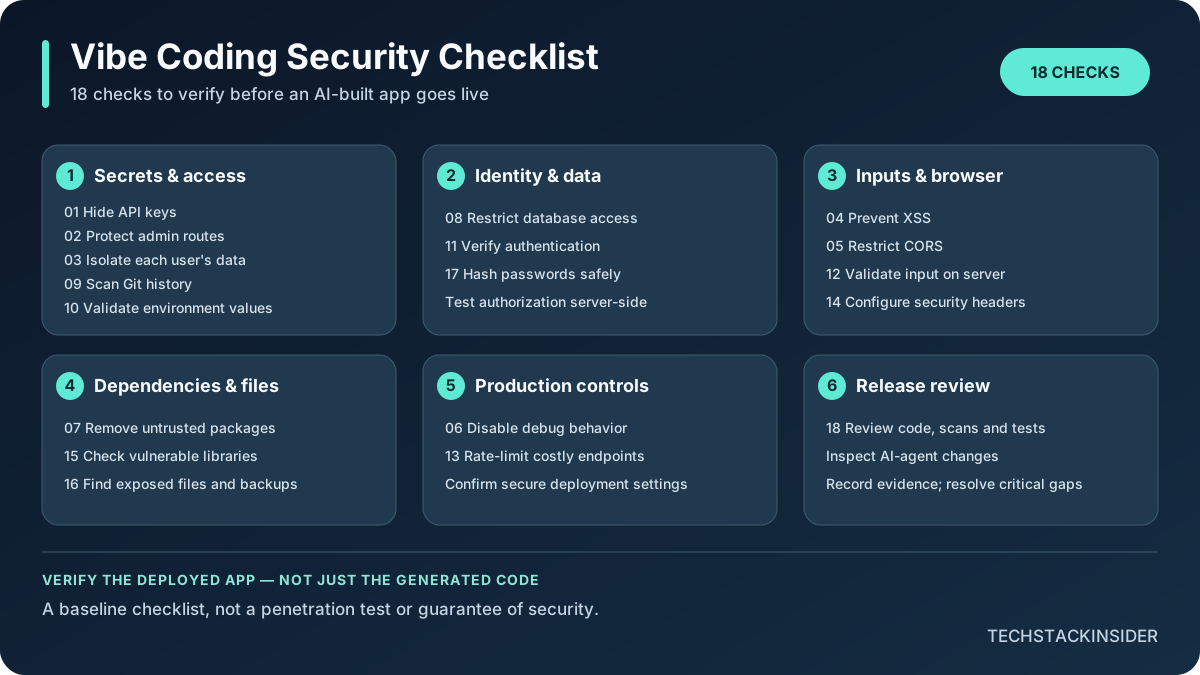
Vibe Coding Security Checklist: What to Check Before Launch
An AI coding tool can produce a convincing interface before the application’s security boundaries are correct. A page that works in a demo does not prove that private records are isolated, admin actions are protected, secrets stay server-side, or production settings are safe.
Use this checklist before exposing an AI-built application to real users. It is a verification aid, not a penetration test, security certification, or guarantee that an application is secure. Leave every box unchecked until you have tested the actual deployed configuration and recorded evidence.
How to use this checklist
For each item, test the running application or inspect the relevant configuration—not just the code suggested by an AI tool. Use a staging environment and test accounts where possible. Never test authorization by accessing another real user’s data.
A useful completion record includes the date, environment or build, test performed, result, and link to the relevant test output or reviewed configuration. If you cannot verify an item, mark it unverified and resolve it before launch when it protects sensitive data or privileged actions.
The 18 checks
1. Hide API keys and service credentials
- Risk: A key embedded in frontend code, browser bundles, source maps, logs, or a public repository can be copied and used by someone else.
- Verification: Search the repository and built client assets for key-like strings; inspect browser network requests and source maps. Confirm that privileged provider calls originate on a trusted server.
- Remediation: Move secrets to server-side environment configuration or a secrets manager. Rotate any credential that was exposed; deleting the visible string alone does not invalidate it.
- Completion evidence: A recorded secret scan, reviewed production bundle, and confirmation that exposed credentials were rotated.
2. Protect admin routes and privileged actions
- Risk: Hiding an admin link in the interface does not stop a user from calling the underlying endpoint directly.
- Verification: With a non-admin test account, request admin pages and invoke privileged API endpoints directly. Verify that the server denies access.
- Remediation: Enforce authorization on the server for every privileged request, deny by default, and grant only the permissions required for the task.
- Completion evidence: Tests showing unauthenticated and ordinary users are denied, while an authorized admin can perform the intended action. See the OWASP Authorization Cheat Sheet.
3. Ensure users can access only their own data
- Risk: An endpoint may trust a user ID supplied by the browser, allowing one account to read or modify another account’s records.
- Verification: Create two test accounts. Attempt to read, update, and delete account A’s records while authenticated as account B, including by changing record IDs in requests.
- Remediation: Derive identity from the validated server-side session or token and check record-level authorization on every relevant operation. Apply database row-level security where appropriate, and test its policies.
- Completion evidence: Repeatable cross-account tests show that unauthorized reads and writes are denied across the affected endpoints.
4. Prevent cross-site scripting (XSS)
- Risk: Untrusted content rendered as executable HTML or script can act in a user’s browser and may expose sessions or data.
- Verification: Identify every place user-controlled text, Markdown, URLs, or rich content is rendered. Test safe, inert XSS test strings in a controlled environment and inspect how output is encoded.
- Remediation: Prefer framework-safe text rendering, context-aware output encoding, and vetted sanitization for intentionally supported HTML. Avoid unsafe DOM sinks; use Content Security Policy as a defense-in-depth control, not as the only fix.
- Completion evidence: Relevant rendering paths and regression tests are documented, and the test payloads render as text or are safely sanitized. See the OWASP XSS Prevention Cheat Sheet.
5. Configure CORS deliberately
- Risk: An overly broad cross-origin policy can expose browser-accessible responses to untrusted origins, especially when combined with credentialed requests or weak authorization.
- Verification: Inspect actual response headers for allowed origins, methods, headers, and credentials. Test requests from an origin that should not be trusted.
- Remediation: Allow only the origins and methods the application needs. Do not combine wildcard origins with credentials. Remember that CORS is a browser policy, not a replacement for server-side authorization.
- Completion evidence: Captured response headers and a negative test showing an unapproved origin is not granted access.
6. Disable debug and development behavior in production
- Risk: Debug pages, verbose exceptions, development servers, and stack traces can reveal internal paths, configuration, or sensitive values.
- Verification: Trigger a controlled error in staging or production-safe testing and inspect the response. Confirm the deployed environment and startup command use production settings.
- Remediation: Disable debug mode, return generic client-facing errors, keep diagnostic detail in access-controlled logs, and remove development-only endpoints and accounts.
- Completion evidence: Deployment configuration review and an error-response test showing no stack trace, secret, or internal configuration is disclosed.
7. Remove unused or untrusted packages
- Risk: Unneeded, typo-squatted, abandoned, or unexpected packages expand the attack surface and may execute install-time scripts.
- Verification: Review direct and transitive dependencies, lockfile changes, package names, maintainers, and install scripts—especially packages an AI agent introduced.
- Remediation: Remove unused dependencies, use the intended official package, pin and lock dependencies using the project’s normal workflow, and investigate unexpected changes before merging.
- Completion evidence: Reviewed dependency diff and lockfile, with a documented reason for each newly introduced package.
8. Secure the database and its access boundary
- Risk: Public database access, excessive service-role permissions, missing row policies, or unsafe queries can expose or corrupt customer data.
- Verification: Inspect database grants, network exposure, row-level security policies, migration history, and application query construction. Test access using the same role the application uses.
- Remediation: Apply least-privilege database roles, parameterized queries, private networking where supported, and tested row-level policies. Keep administrative credentials out of client code.
- Completion evidence: A reviewed permissions/policy record and tests showing the application role can perform only intended operations.
9. Check Git history for leaked secrets
- Risk: A credential removed from the latest file may remain in earlier commits, branches, pull requests, or forks.
- Verification: Run a secret scanner across the repository and its history, including branches relevant to release. Review alerts rather than assuming every match is valid or every scan is complete.
- Remediation: Revoke or rotate exposed credentials immediately. Follow the repository host’s documented process for history cleanup if needed, while recognizing that rewriting history does not revoke a secret already copied.
- Completion evidence: Scan results, disposition of findings, and proof of rotation for any confirmed exposed credential.
10. Validate production environment variables
- Risk: Missing or incorrect environment values can silently disable protections, point production at test services, or expose secrets through logs and error output.
- Verification: Compare required variables with the production deployment configuration. Confirm production endpoints, cookie/security settings, authentication secrets, and service permissions without printing secret values.
- Remediation: Fail safely when critical configuration is absent; use separate credentials per environment, restrict who can view or edit deployment variables, and avoid logging their values.
- Completion evidence: A reviewed configuration checklist that records variable names and validation outcomes, never the secret values themselves.
11. Verify authentication behavior
- Risk: Weak session handling, broken password reset, missing account-state checks, or inconsistent endpoint protection can let attackers impersonate users.
- Verification: Test sign-up, sign-in, sign-out, session expiry, password reset, email verification if used, and access to protected endpoints. Confirm sensitive actions re-check the authenticated identity.
- Remediation: Use a maintained authentication library or provider, secure session cookies, appropriate session rotation and expiry, and multi-factor authentication for high-risk administrative access where feasible.
- Completion evidence: A documented authentication test run covering successful flows and negative cases. See the OWASP Authentication Cheat Sheet.
12. Validate and safely handle every input
- Risk: Unexpected input can cause injection, invalid state, resource exhaustion, or unsafe downstream processing.
- Verification: Inventory forms, query parameters, API bodies, file uploads, webhooks, and AI-generated outputs that feed into sensitive operations. Test missing, malformed, oversized, and unexpected values.
- Remediation: Validate types, formats, ranges, and size limits on the server; use parameterized database queries; encode output for its context; and treat client-side validation as a usability aid only.
- Completion evidence: Tests for invalid and boundary inputs, with server-side validation and safe error handling verified. See the OWASP Input Validation Cheat Sheet.
13. Add rate limits and abuse controls
- Risk: Automated abuse can overwhelm the app or run up costs through login attempts, expensive endpoints, file uploads, or AI-model calls.
- Verification: Identify costly and abuse-prone operations. In staging, test repeated requests and confirm limits work across the intended identity or network boundary.
- Remediation: Apply endpoint-appropriate limits, quotas, request-size bounds, and abuse monitoring. Add stricter controls to authentication, password reset, and paid or costly AI operations.
- Completion evidence: Recorded limit configuration and controlled tests showing excess requests are throttled or rejected without breaking normal use.
14. Set appropriate security headers
- Risk: Missing browser security controls can increase the impact of injection, framing, content-type confusion, or insecure transport.
- Verification: Inspect response headers on the deployed HTTPS site, including Content-Security-Policy, Strict-Transport-Security where appropriate, X-Content-Type-Options, and frame protections.
- Remediation: Configure headers to match the application and test for breakage. Deploy CSP carefully; do not copy a policy blindly or rely on headers to repair unsafe application logic.
- Completion evidence: Captured production response headers and a smoke test confirming the policy works. Use the OWASP HTTP Headers Cheat Sheet as a reference.
15. Check and update vulnerable dependencies
- Risk: A known vulnerable library or runtime can undermine otherwise careful application code.
- Verification: Run the package manager’s audit and any available dependency or platform security scans. Review the affected package, vulnerable version range, exploitability in your usage, and whether the scan covers the deployed artifact.
- Remediation: Upgrade to a supported fixed version, replace or remove the package, or document a time-bounded mitigation when a safe upgrade is not yet possible. Do not blindly apply breaking upgrades to silence a report.
- Completion evidence: Dated scan output, reviewed findings, and verified fixes or documented exceptions. For npm projects, see the npm audit documentation.
16. Check for exposed files and unintended public assets
- Risk: Backups, environment files, source maps, test exports, logs, database dumps, or internal documents may be served publicly.
- Verification: Inspect the production build and public asset directory. Request likely sensitive paths in a controlled test and confirm the hosting configuration does not expose private files.
- Remediation: Keep secrets and private data outside public directories; remove unnecessary artifacts from the build; configure access controls and routing rules for private resources.
- Completion evidence: Reviewed build artifact inventory and a recorded set of negative requests for sensitive paths.
17. Store passwords with an appropriate password-hashing algorithm
- Risk: Plaintext passwords or fast general-purpose hashes make a credential database breach much more damaging.
- Verification: Inspect the authentication provider or password-storage implementation and its configuration. Confirm passwords are not logged, returned by APIs, or stored in reversible form.
- Remediation: Prefer a maintained authentication provider where appropriate. If managing password storage yourself, use a modern password-hashing scheme such as Argon2id with parameters appropriate to the deployment; follow current OWASP guidance for alternatives and legacy migration.
- Completion evidence: Reviewed provider/configuration documentation and tests confirming password values are never exposed in responses or logs. See the OWASP Password Storage Cheat Sheet.
18. Run a security review before release
- Risk: Individual fixes can miss interactions between authentication, authorization, business logic, dependencies, deployment settings, and AI-agent changes.
- Verification: Review the complete diff since the last known-good revision; run relevant automated tests and security scans; manually test the most sensitive user journeys and access boundaries. Include changes proposed by coding agents, not just code written by a person.
- Remediation: Fix high-risk findings, add regression tests, narrow permissions, and get an independent review for sensitive payment, identity, tenant-isolation, or administrative flows. Do not treat a green build as proof of security.
- Completion evidence: A dated review record linking the reviewed revision, test/scan results, resolved findings, accepted exceptions, and the person accountable for release.
What the checklist cannot prove
Passing these checks does not guarantee that an application is secure. This list is a baseline for common web-application risks; the appropriate depth of review depends on the data you handle, who can use the app, its integrations, and the consequences of failure. Applications handling payments, health information, financial data, or other high-impact workloads may need specialist testing and legal or regulatory review.
AI-generated code deserves the same scrutiny as any other code. In addition, inspect agent permissions, generated dependency changes, test changes, and any automated actions that can affect production. A coding assistant’s claim that it fixed a vulnerability is not evidence that the fix works.
For broader risk categories, consult the OWASP Top 10. For risks specific to AI-assisted development, consult the OWASP GenAI Security Project. For editor-level data handling and agent permissions, see TSI’s comparison of AI code editor security and permissions. For safer work on an existing repository, see how to review AI coding-agent changes safely.
Before you launch
Do not use the number of checked boxes as a security score. Record unresolved items, assign an owner, and make a release decision based on the risk and evidence. If you cannot verify a critical control, delay launch or obtain qualified review rather than assuming the generated code got it right.
Frequently Asked Questions
Is AI-generated code safe to launch if the app works?
Not necessarily. A working interface does not prove that access controls, secrets, input handling, dependencies, and production settings are secure. Verify the deployed application and keep evidence of the tests.
What should I check first before launching a vibe-coded app?
Start with exposed secrets, server-side authorization, whether users can access only their own data, authentication, and database permissions. These can expose credentials or sensitive records if they are wrong.
Can I keep API keys in frontend environment variables?
Only values explicitly designed to be public should be exposed to the browser. Frontend build tools can embed client-side environment values in downloadable assets. Keep privileged API keys on the server and rotate any key that was exposed.
Does hiding an admin page protect it?
No. Enforce authorization on the server for every privileged page and API operation. Test direct requests with an ordinary account, not just whether the admin link is visible.
Is a security scan enough to prove my app is secure?
No. Scanners can miss business-logic and authorization flaws, and results depend on what was scanned. Combine dependency and secret scans with manual review, targeted tests, and checks of the deployed configuration.
Do I need a professional security review?
Consider independent specialist review when the app handles payments, sensitive personal data, complex permissions, multi-tenant records, or other high-impact workflows. This checklist is a baseline, not a penetration test or security certification.
Related Articles
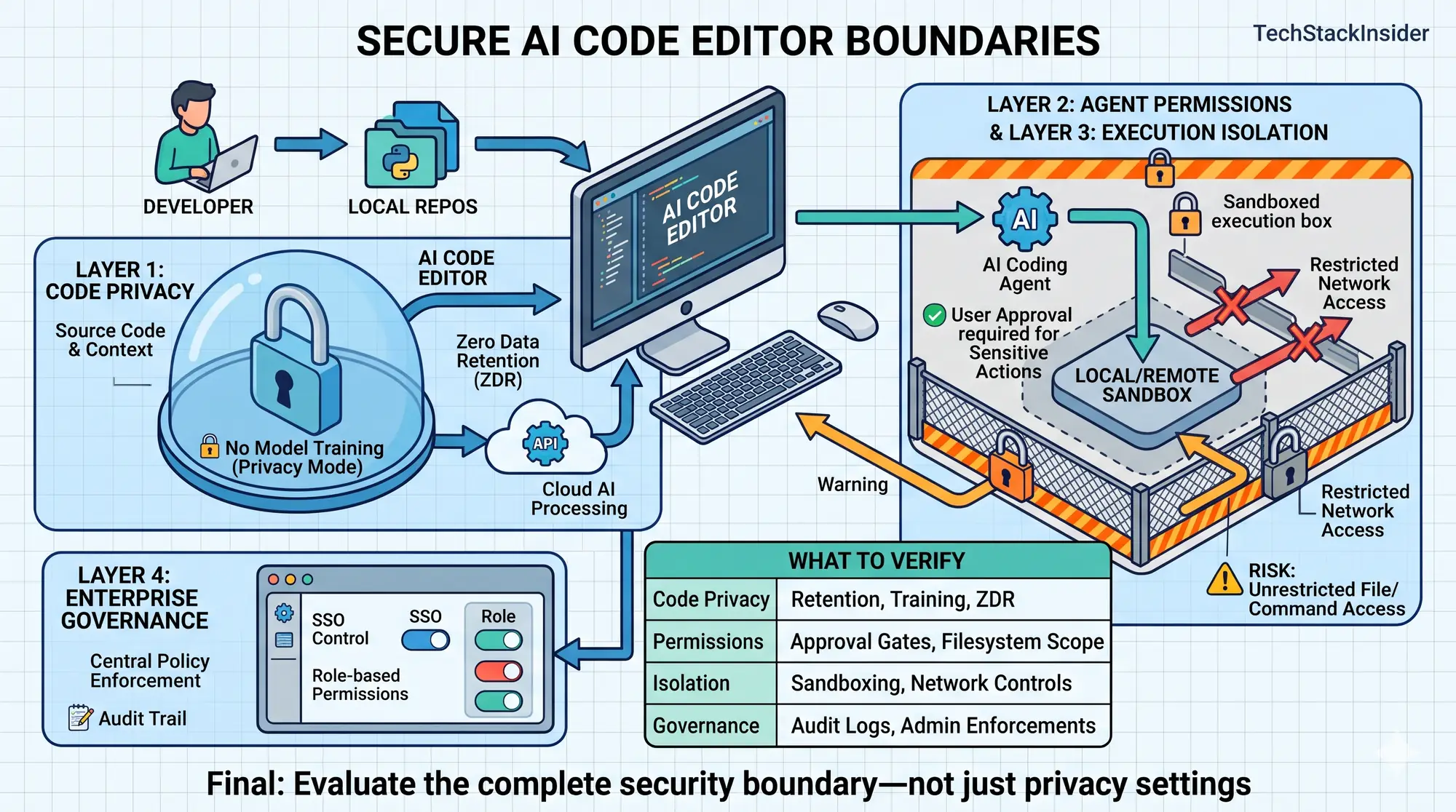
Most Secure AI Code Editors: Privacy, Permissions, and Enterprise Controls Compared
Compare AI code editors by code privacy, agent permissions, sandboxing, network controls, and enterprise governance to choose the right security fit.
How to Use AI Coding Agents Safely on an Existing Codebase
Learn how to use AI coding agents on an existing codebase with scoped tasks, risk-based permissions, independent tests, diff reviews, and safe rollback.
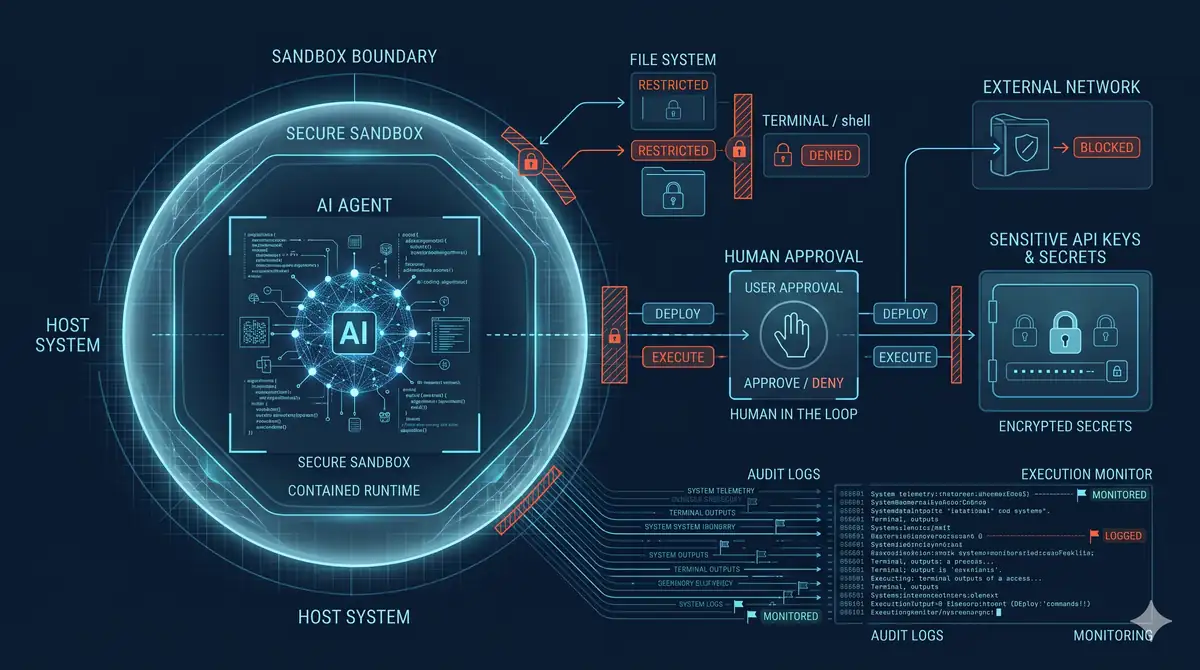
AI Coding Agent Security: Risks, Permissions, Sandboxing, and Safe Execution
Understand AI coding agent security risks—from prompt injection and secret exposure to unsafe commands—and learn how to apply least privilege, sandboxing, and reviewable execution.